

Amazon settings
Amazon Settings is where your Amazon connection lives once it is set up. It lists each region with its marketplaces, and shows whether Seller Central and Amazon Ads are connected. A quick check here keeps your reports flowing. The Amazon connection is part of the Lite and Pro plans.
Open Amazon Settings
Section titled “Open Amazon Settings”- Open the user menu (top right).
- Click Amazon Settings.
The table shows one row per region, with its Marketplaces (how many are enabled), and the Seller Central and Amazon Ads status: Authorized, Action needed, Error or Not connected. Click a region to open it.
Not connected yet? See Connect Amazon.
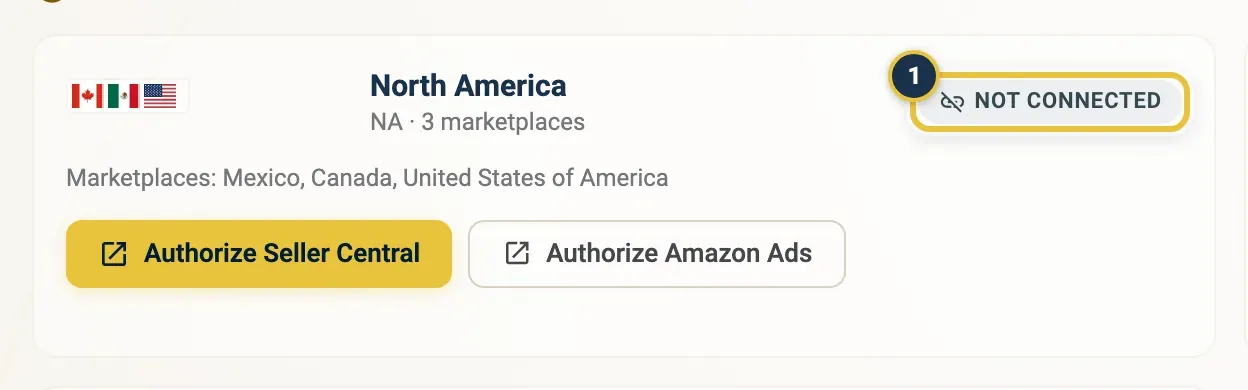
Before any region is connected, each region shows Not connected (1) and the page is called Connect Amazon.
Once a region is connected, the page title changes to Amazon Settings and the cards are replaced by the regions table: one row per region, with the number of enabled marketplaces and a coloured status chip for Seller Central and one for Amazon Ads.
Add a marketplace in Amazon Settings
Section titled “Add a marketplace in Amazon Settings”Started selling in a new country?
- In Amazon Settings, click the region the country belongs to.
- Open the Marketplaces tab.
- Tick the country in the Seller Central column. Tick Ads too if you advertise there.
- Click Save.
The marketplace joins your reports from the next import.
Re-authorize an Amazon region
Section titled “Re-authorize an Amazon region”When EasyReports needs new Amazon permissions, a region shows Action needed, and a Re-authorize Amazon banner appears at the top of Amazon Settings.
- Click the region marked Action needed.
- On the Overview tab, click Re-authorize next to Seller Central (or Amazon Ads).
- Sign in to Amazon and approve. It takes about a minute and keeps your marketplaces and settings.
Don’t click Disconnect instead: that removes the connection rather than renewing it.
Pick the preferred Amazon Ads profile
Section titled “Pick the preferred Amazon Ads profile”With Amazon Ads connected, you choose which Ads profile your advertising reports come from, per marketplace.
- In Amazon Settings, click the region.
- Open the Ads Profiles tab.
- For each country, pick one profile.
- Click Save.
Profiles you don’t pick stay linked but aren’t used.
Disconnect Seller Central or Amazon Ads
Section titled “Disconnect Seller Central or Amazon Ads”Only disconnect if you really want EasyReports to stop receiving data for that region.
- In Amazon Settings, click the region.
- On the Overview tab, click Disconnect next to Seller Central or Amazon Ads.
The connection is removed straight away, without asking you to confirm. To connect again, click Authorize and approve on Amazon.
Good to know
Section titled “Good to know”- Changes in a region panel apply only to that region.
- Amazon Settings is per organisation. If you work for more than one, pick the right one in the user menu first. See Organisations, teammates and switching.