

Replenishment: manual
Without the Amazon connection, you first create the shipment in Seller Central, then record it as a replenishment in EasyReports. This works on every plan. On Lite and Pro, EasyReports can also do the Seller Central part for you: see Replenishment: automatic.
Create the shipment in Seller Central
Section titled “Create the shipment in Seller Central”- In Seller Central, open Manage All Inventory, select the products, and choose Send to Amazon.
- The first time, add the FreightNI China warehouse as a ship-from address, with your company name as the full name. The address, line by line, is below in FreightNI China warehouse address. After that, check it is selected: Amazon defaults to your last address.
- Enter the packing details: units per box, box dimensions and weight, and the number of boxes. For the US, use inches and pounds. Prep and labelling fees should stay at zero.
- Choose Amazon Fulfillment Center and your own carrier, not the Amazon partnered carrier. Set the ship date five working days out.
- Choose small parcel delivery and carrier “Other”, then how it travels: ocean for sea freight, air for air express. By sea, set the delivery window to about six weeks after the ship date. Shipping fees should be zero. Then accept and confirm.
- Note the shipment ID and the eight-character reference ID. The reference ID can take a few minutes to appear.
- Print the labels, one label per A4 page, and keep the PDF’s file name.
In the US, Amazon may split your boxes across warehouses for a placement fee. That is Amazon’s charge, not FreightNI shipping. For a few boxes, one destination is usually simplest.
FreightNI China warehouse address (ship from)
Section titled “FreightNI China warehouse address (ship from)”Use this address as the Ship from address when you create a manual replenishment shipment in Seller Central. Put your own company name in the name field, and copy each line into the matching Seller Central field:
| Seller Central field | What to enter |
|---|---|
| Full name | Your company name |
| Address line 1 | No. 23, Meishida Warehouse |
| Address line 2 | No. 508 Hehua South Street, Choujiang Street |
| City | Yiwu |
| State / Province / Region | Zhejiang |
| Postal code | 322008 |
| Country | China |
| Phone number | 0086-18954545254 |
The same address in one block, for copying:
Freight NI China WarehouseNo. 23, Meishida WarehouseNo. 508 Hehua South Street, Choujiang StreetYiwu, Jinhua, Zhejiang 322008ChinaPhone: 0086-18954545254Email: enquiries@freightni.comYiwu is in Jinhua prefecture. If Seller Central asks for a district or county, enter Jinhua. For questions about the warehouse, email enquiries@freightni.com.
Record a manual replenishment in EasyReports
Section titled “Record a manual replenishment in EasyReports”- Go to Warehousing > Replenishments and click Add replenishment.
- In Shipment details, choose the same Shipping method and Destination as in Seller Central.
- If you see Amazon shipment, choose Existing shipment.
- Paste the Amazon FBA shipment ID (for AWD: AWD STAR shipment ID). With Amazon connected, click Auto Populate to fill in the products. Click Continue.
- In Products, add each product with its Number of cartons, and click Upload the PDF label to add its label file, as Amazon named it. Click Continue.
- In FreightNI quote, check the shipping cost, and click Continue.
- In Amazon shipment details, enter the Amazon Reference ID (for example 6QXTNCXD). The warehouse team needs it to clear Chinese customs. Click Continue.
- In Review, check everything and click Submit.
The FreightNI invoice follows by email.
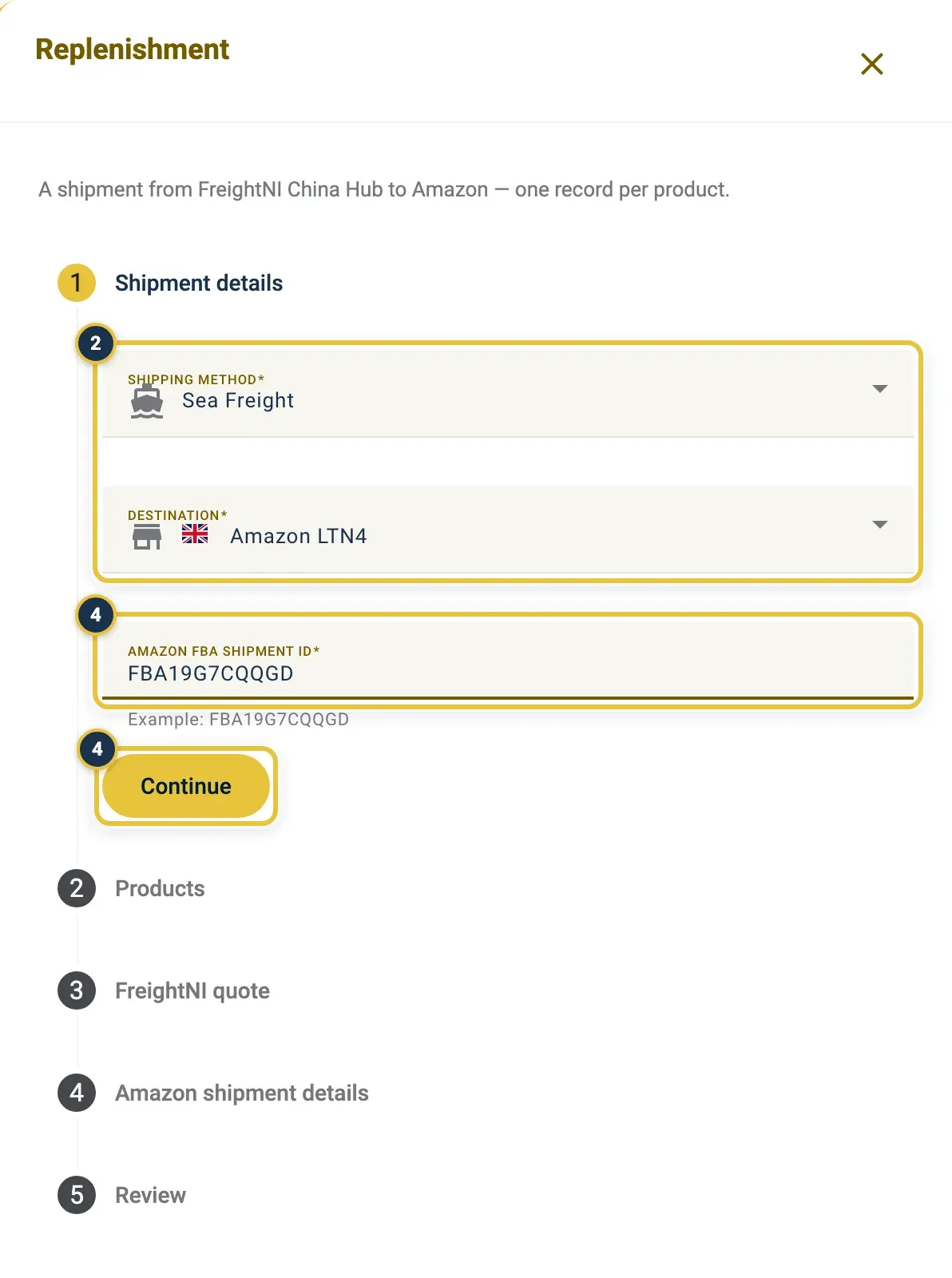
Shipping method and Destination (2), then the Amazon FBA shipment ID and Continue (4).
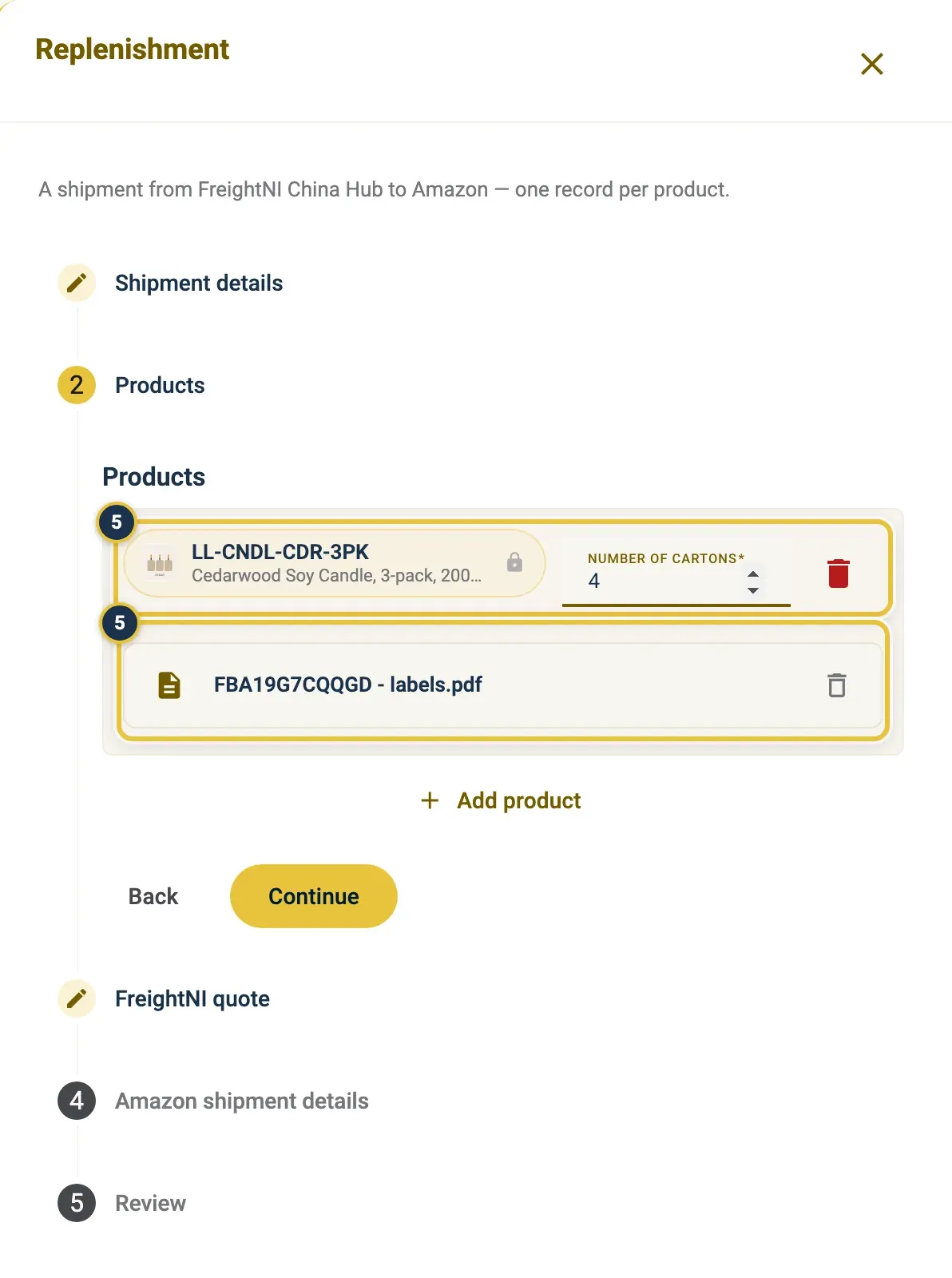
The product and its Number of cartons, and the label PDF under it (5).
From Add replenishment to the Products step, with a label PDF added. The request is not saved until you click Continue on Products.
Record a split shipment
Section titled “Record a split shipment”If Amazon split your shipment into several shipment IDs, add one replenishment for each shipment ID. Repeat the steps above for every shipment, each with its own labels.
Good to know
Section titled “Good to know”- The FBA shipment ID looks like FBA19G7CQQGD. The reference ID must not contain spaces.
- Your request is saved as a Draft once you continue past Products, so you can close it and carry on later.
- After you submit, follow the replenishment like any other. See After you submit.